
Managing Locations
Configuring Locations to Assign to Assets

Setting up Project Locations
Manage Levels
Select Manage Locations, from along the menu bar.
ATLAS allows you to build a location hierarchy of up to 7 levels.
The manage levels setting allows you to specifiy how each of the available 7 levels of location hierarchy are classified. For example:
Level 1 = Overall Project Name/Location
> Level 2 = Project Area
>> Level 3 = Zone
>>> Level 4 = Building
>>>> Level 5 = Building Level
>>>>> Level 6 = Room
>>>>>> Level 7 = Room Location (e.g. floor, ceiling, wall)
Adding Project's locations:
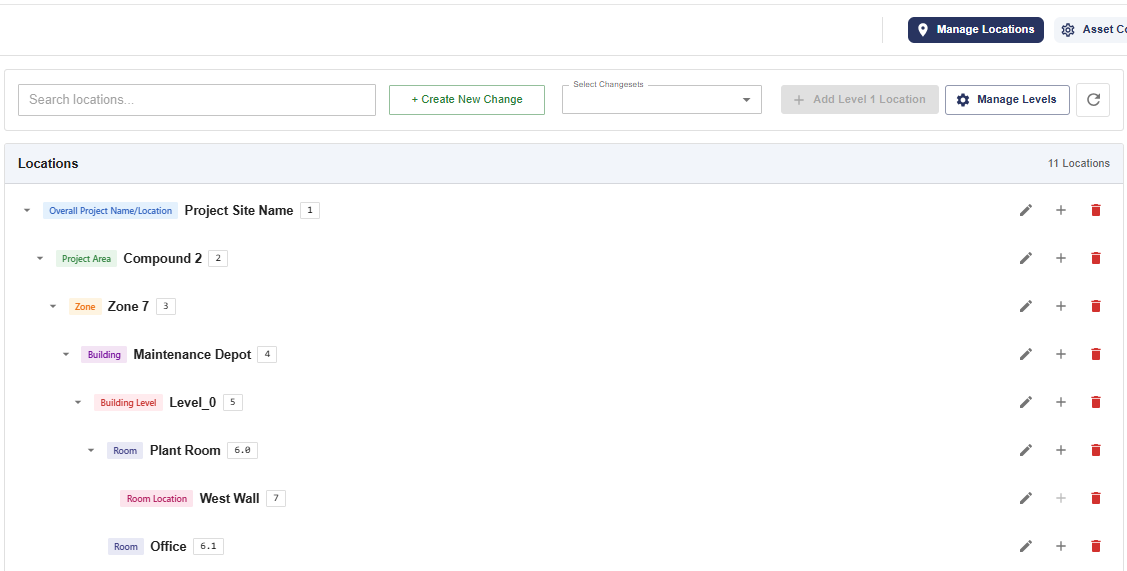
- Select Manage Locations, from along the menu bar
- Create or activate an existing changeset
- Click 'Add Level 1 Location'
- Specify a Location Name and Location Code (both fields are required)
- Click the tick button to create the location
- Repeat steps 3 to 5 to create additional level 1 locations
- To create sub level locations click on the plus '+' button against a location
- Specify a Location Name and Location Code (both fields are required)
- Click the tick button to create the location
- Repeat steps 7 to 9 to create additional sub level locations
Updated 3 months ago
Did this page help you?