
Viewing Results
Reviewing the Results of a Model Rules Check
Once a model rules check has completed against a model the results are available through the 'Model Rules' option within the model menu.
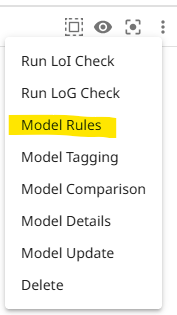
This will open the results table displaying the results of the last checks run.
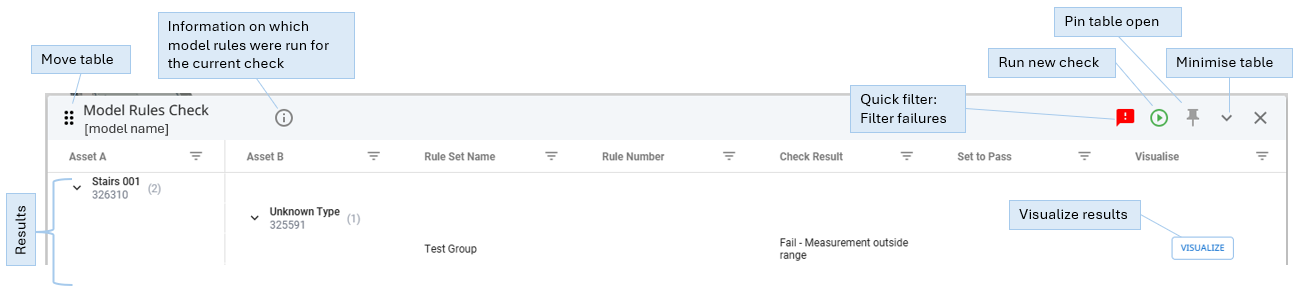
The results table displays all model elements that were involved in a rule check whre they were treated as the 'Asset A', so all passes and failures will be listed.
To filter the table on failures only, the quick filter within the table header can be used.
Each result can be visualized by clicking on the corresponding visualize button. This opens a visualization window displaying a visual representation of what has been checked depending on the rule that was run.
If multiple rules were checked against the same element then these can be clicked through within the visualization window.
Note: Information checks will not have a corresponding visualization as these checks only concern the element's data properties and not their geometry.
Failure Types
Single Asset Class
Information Checks
- Missing attribute - means that the attribute specified for the check class is not present against the model element.
- Wrong attribute value - means that the value within the model element's attribute does not match any of the values defined for the check.
- Missing attribute value - means that attribute exists against the element but has not been populated.
Geometry Checks
- Element Geometry out of permitted tolerance range - means that the model element geometry is not within the template's defined dimension tolerances.
- Template id [x] invalid model - means there is an error with the model file uploaded for the matching template.
Area Checks
- Measurement outside range - means the area of the element being checked is outside of the value defined within the check.
Gradient Checks
- Measurement outside range - means the gradient of the element being checked is outside of the value defined within the check.
Asset Class (A) to Asset Class (B)
A to B Checks
- Measurement outside range - means the distance between the specified elements of the check is outside of the values defined within the check.
Updated 9 months ago