
Document Intelligence
Document Intelligence within the EMT Documents module, is a conversation tool to aid in the interrogation of documentation, by asking natural language questions against a document in order to gain insights into the document content.
This feature is in phased rollout mode where capabilities are being rolled out gradually in phases. If you would like to provide feedback or helpful ideas, please feel free to contact your project Information Manager or email [email protected]
Data Security and Privacy
Your data security and privacy is paramount to us.
The AI models used to provide this Document Intelligence are entirely self contained within the EMT infrastructure. This is held locally on our UK based servers.
Your data will never travel outside of EMT architecture and the EMT Document Intelligence does not connect to any wider online models.
Required Roles
For Users to have access to the Document Intelligence feature, they must be assigned to one of these ATLAS roles:
- ATLAS:Creator
- ATLAS:Admin
Intelligence Conversations
The conversation tool will only reference the content of the active document/document pack and will neither source information from other sources, or hallucinate content for answers.
Accessing Document Intelligence
For documents that have been processed through the AI model in readiness for conversation, within the document viewer in the bottom left-hand corner you will see the Document Intelligence icon.

-
Click the icon
-
The conversation window will open on the right-hand side as to not obstruct the document view
-
Click upon the plus icon to begin a new conversation.
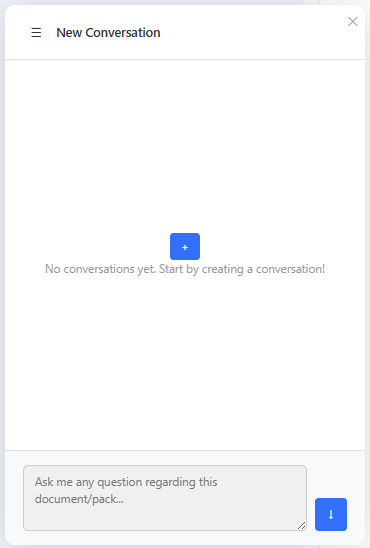
To start additional conversations, click on the hamberger menu icon in the top left of the chatbot and click on 'New'.
-
In the pop-up, add a name for your conversation.
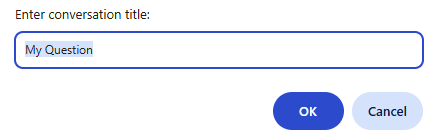
-
Once named, you can begin asking questions within theconversation window.
Conversation Responses
Document Intelligence will respond with detail taken from the active document/pack, whilst also including source links to locations within the document from which the responses were sourced.
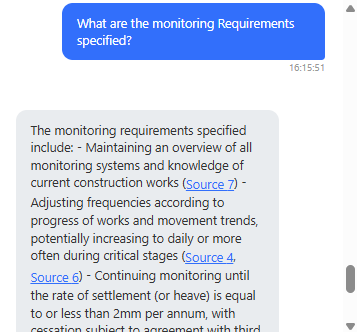
When responses are provided, the document intelligence will automatically determine a conversation context from the question asked.
These contexts appear above the question entry field and are optional to select.
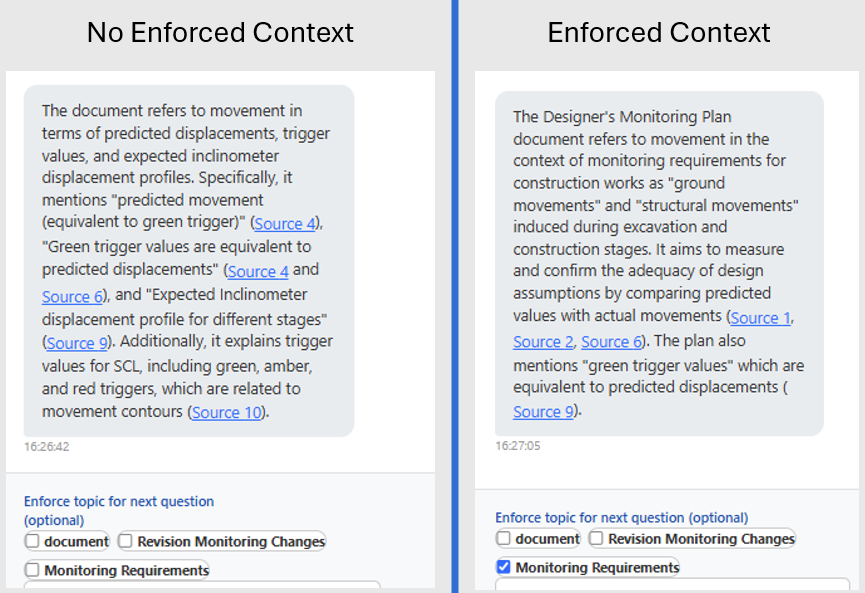
Selecting a context when asking a question, will inform the conversation that the question your are asking should be considered in the selected context, therefore the focussing the response, rather than the applying the question generally across the document.
Here's an example of the differeing responses to the same question when a context is applied or not.
Question: "how does the document refer to movement?"
Document Intelligence Scenarios
Document Packs
When using document intelligence within a document pack, conversations will refer to all documents within the pack, and therefore source it's response information from across all documents.
From within a pack, if you choose to enter revision compare mode for a specific document, the active conversation against the pack will close and a conversation for the specific document will begin - either by starting a new conversation or continuing with an existing.
Individual Documents
For individual documents document intelligence only refers to the information contained within the document.
On entering revision compare mode, the active conversation will remain open and will then refer to both revisions for it's responses.
You can ask comparative questions when in compare mode, to help identfy where changes have been between revisions.
Updated about 14 hours ago