
More information about changeset status, lifecycle and publish process in EMT ATLAS
Changeset Status Transitions & Permissions
USERS WITH ROLES
Changeset Owner
(having roles: Creator, Admin, or Approver)
(having roles: Creator, Admin, or Approver)
Changeset Approver
(having roles: Approver or Admin)
(having roles: Approver or Admin)
Admin User
(having role: Admin)
(having role: Admin)
WIP
(Work In Progress)
SHARED
(Shared For Approval)
Shared with Changeset Approver
PUBLISHED
(Final)
ROLLED BACK
(Rolled Back)
REJECTED
(Changes Rejected)
Concurrent Edits and changeset Conflicts
EMT ATLAS supports concurrent editing of an asset by multiple users in their own changesets as illustrated below.
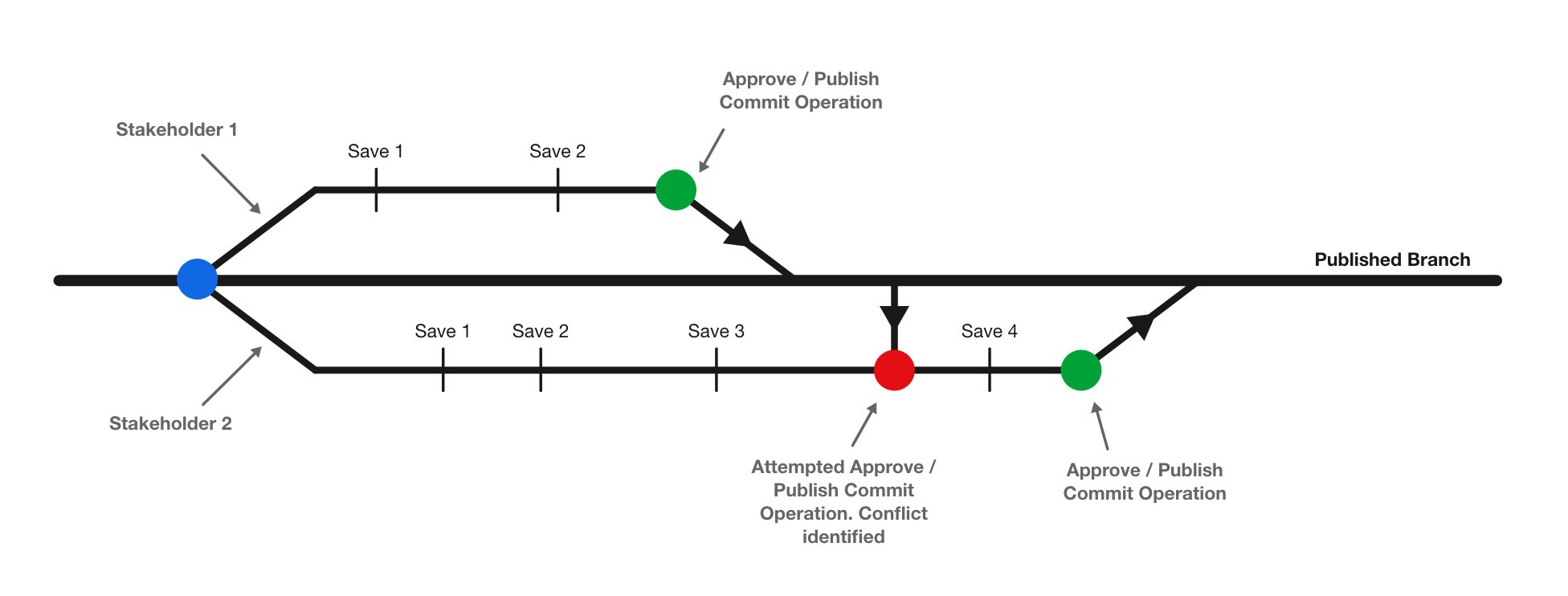
As a result when sharing or publishing a changeset, users may get a 400 Error response with a count of conflicted asset revisions that need resolution from the api client/caller side.
Resolving Conflicts
Publish/Share by Changeset Owner
1Changeset ready for publish/share
→
2Conflicts Occur
Conflicts Occur
(Publish/Share attempt fails)
(Publish/Share attempt fails)
On conflict, the following fields are updated on the Changeset
- last_published_attempt_at / last_shared_attempt_at
- last_published_attempt_by / last_shared_attempt_by
- publish_failure_reason / share_failure_reason
→
3Rebase Asset (Individual)
Rebase Asset (Changeset owner)
- Each asset is rebased individually — no bulk endpoint is called
- When user proceeds to rebase an asset, call endpoint to get that asset's conflicting attributes
If conflicting attributes list is EMPTY
Keep Latest changes removes your version from the changeset
If conflicting attributes list is NOT EMPTY
If Edit / Auto Merge is chosen and the associated changeset status is AUTHORIZED, it is automatically converted to WIP — no manual status change is needed
↓
4Retry Share/Publish
Publish/Share Changeset (Changeset Owner)
Conflicts Resolved
→
5PUBLISHED/SHARED
PUBLISHED/SHARED
(by Owner/Admin)
Result:
* Admin can publish their changeset from WIP
**Admin must take ownership of changeset first if they are not the changeset owner
Code Sample
Here is a code sample with documentation and transition diagrams to simulate a changeset conflict
The rebase endpoints are documented in the spec.
Call summary
| Step | Call | Success |
|---|---|---|
| Publish | PATCH /asset/changeset/{id}/ with {"status":"published"} | 200 |
| Inspect failure | GET /asset/changeset/{id}/ → publish_failure_reason, conflicted_assets | 200 |
| List conflicting attributes | GET /asset/asset_revision/{id}/rebase/ → conflicts[].attribute_name | 200 |
| Resolve | POST /asset/asset_revision/{id}/rebase/{keep_mine|auto_merge}/ | 200 |
| Take over another user's changeset | POST /asset/changeset/take_ownership/{changeset_id}/ | 200 |
All calls require tenant_id as a query parameter.
Taking changeset ownership
In case a changeset owner is unable to complete pending actions on their changeset, admin users are able to take ownership of that changeset.
1
Changeset Owner not available
Changeset is WIP, REJECTED or AUTHORISED
➜
2
Admin Calls Take Ownership Endpoint
Take Ownership (Actions):
- Create new Changeset 2 by Admin User (inherited_from_changeset = 1)
- Copy all pending assets from Changeset 1 to Changeset 2 (as new pending rows)
- Roll back Changeset 1 (update status to ROLLED BACK)
➜
3
Ownership Taken Successfully
Changeset 2
Status: WORK IN PROGRESS
(Owner: Admin User)
inherited_from_changeset: 1
Changeset 1
Status: ROLLED BACK
(Owner: Previous owner)
All its changes are preserved as rolled back revisions.